FMI and SSP
An FMU (Functional Mock-up Unit) is a single file that packages a model so that another simulation tool can run it. FMI is the standard that defines how those files work.
daedalus fmu exports a model as an FMU for FMI 2.0 or 3.0, so it runs in any FMI importer: Simulink, Dymola, OpenModelica, FMPy, Silver, or your own co-simulation
master. One FMU carries both interfaces:
- Co-Simulation. The FMU steps itself with the model's own BDF or Dopri5 solver and
event handling, inside
fmi2DoStep. - Model Exchange. The importer integrates; the FMU exposes the states, their derivatives and one event indicator per relation.
Exporting
cargo build --release -p daedalus-cli -p daedalus-fmi
./target/release/daedalus fmu library/Daedalus -m Daedalus.Examples.TorqueConverter.StallTest -o StallTest.fmu
FMU Daedalus_Examples_TorqueConverter_StallTest: 552 variables, 2 states, 2 event indicators, 0 inputs, 0 outputs
wrote StallTest.fmuThe archive holds:
| File | What |
|---|---|
modelDescription.xml |
Parameters, inputs, outputs, states, derivatives and every other variable, with the ModelStructure |
resources/model.bin |
The compiled model: the tape and its metadata |
binaries/linux64/<id>.so |
The model-independent FMI runtime (daedalus-fmi) |
The runtime is the same library for every model; only model.bin changes. daedalus fmu
finds it next to the daedalus executable, or through --fmi-lib or
DAEDALUS_FMI_LIB. The release archives ship it
next to the CLI.
Validated with FMPy
CI exports StallTest.fmu on every pull request, validates modelDescription.xml with
FMPy, runs the FMU both as Co-Simulation and as Model Exchange (with FMPy's CVode), and
compares both runs with daedalus simulate:
./target/release/daedalus simulate library/Daedalus -m Daedalus.Examples.TorqueConverter.StallTest \
    -o ref.csv --vars rpm_engine,rpm_stall_theory
python3 tools/fmu_check.py StallTest.fmu ref.csv rpm_engine,rpm_stall_theory
fmpy validate StallTest.fmu: no problems found
CS: 1001 rows to t = 4.0
CS rpm_engine: max deviation 4.97e-06 of its range (final 2160.538718 vs 2160.538639)
CS rpm_stall_theory: max deviation 8.78e-07 of its range (final 2160.538718 vs 2160.538705)
ME: 1001 rows to t = 4.0
ME rpm_engine: max deviation 3.28e-06 of its range (final 2160.538718 vs 2160.538639)
ME rpm_stall_theory: max deviation 8.90e-07 of its range (final 2160.538718 vs 2160.538705)
OK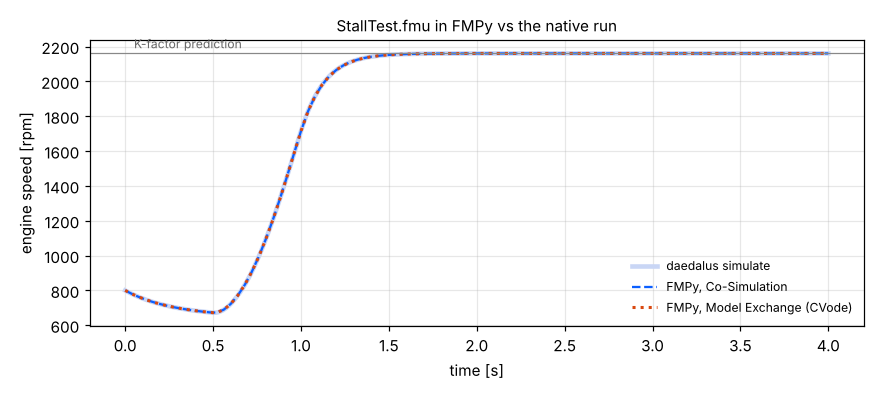
FMI 3.0
--fmi-version 3 writes the same model as an FMI 3.0 FMU (x86_64-linux):
daedalus fmu library/Daedalus -m Daedalus.Examples.TorqueConverter.StallTest --fmi-version 3 -o StallTest3.fmuFMU Daedalus_Examples_TorqueConverter_StallTest (FMI 3.0): 552 variables, 2 states, 2 event indicators, 0 inputs, 0 outputs
wrote StallTest3.fmuThe same runtime implements the fmi3* API: Float64, Int32 and Boolean variables,
fmi3UpdateDiscreteStates, and exact directional derivatives from the forward tangents
of the compiled equations, available after initialization.
Using the FMU from Python
from fmpy import simulate_fmu

res = simulate_fmu("StallTest.fmu", fmi_type="CoSimulation",
                   stop_time=4, output=["rpm_engine"])
print(res["rpm_engine"][-1])   # 2160.5
Parameters are set the usual way, with start_values={"engine.J": 0.3}.
Importing FMUs
Diokle also runs FMUs from other tools, FMI 2.0 or 3.0, on their own or as components
of a Modelica model. Loading an FMU executes the native binary inside it. That is refused
unless you pass --allow-fmu-code, or the FMU was just written by this same process:
# simulate an FMU on its own: Model Exchange if it has it
daedalus --allow-fmu-code simulate StallTest.fmu -o fmu.csv --vars rpm_engine
daedalus --allow-fmu-code simulate StallTest.fmu --fmi-type cs --comm-step 0.004 -o cs.csv

# a wrapper block to use as a component in any model
daedalus import-fmu Plant.fmu -o Plant.mo [--fmi-type me|cs] [--comm-step H] [--class NAME] [--within PKG]
The wrapper declares the FMU's parameters with their units and descriptions, and its inputs and outputs as connectors:
block StallTest "Daedalus.Examples.TorqueConverter.StallTest (Diokle) (FMU, ModelExchange)"
  parameter Real engine_tau_drag(unit = "N.m") = 20.0 "Friction (motoring) torque at 3000 rpm (engine.tau_drag)";
  parameter Real engine_J(unit = "kg.m2") = 0.2 "Engine (crank + flywheel) inertia (engine.J)";
  ...
and an annotation __Daedalus_FMU(fileName = "Plant.fmu", fmiType = "ModelExchange")
that names the file relative to the .mo.
- Model Exchange. The FMU's states are integrated together with the model's, and its event indicators are located like the model's own zero crossings. Its time events and discrete state updates take part in the event iteration, and outputs that depend directly on inputs are iterated to a fixed point. Every integrator works; the implicit ones use a difference Jacobian, since Diokle cannot see inside an FMU.
- Co-Simulation. The FMU is stepped over the communication grid, with its inputs held over each step. Its outputs change at the grid points, so a signal through a chain of Co-Simulation FMUs is delayed one step per FMU.
FMU components need the native tools, the command line or the Python package. The browser
workbench reports an error for them, and linearize and steady refuse them.
crates/daedalus-cli/tests/fmu_import.rs imports exported FMUs back and compares them
with the native simulation.
SSP
SSP packages describe systems of connected FMUs:
daedalus --allow-fmu-code simulate System.ssp --comm-step 0.01 -o sys.csv  # run as a co-simulation master
daedalus import-ssp System.ssp -o System.mo                 # one model, a wrapper per FMU
daedalus export-ssp . -m Loop -o Loop.ssp                   # a model made of FMU components
import-ssp reads SystemStructure.ssd: the FMU components, parameter bindings inline
or in .ssv files, connections, system connectors and the default experiment. Nested
systems are not supported.
export-ssp packs a model's FMU components with their parameter values, placements and
connections. The model must be in the folder or file you name (here . finds Loop in
the current folder), and each component must be an FMU wrapper block made by
import-fmu, declared directly in that model. Wire the components with connect
statements: equations between them are not exported as connections. The FMU named by each
wrapper's fileName is packed into the archive. For example, a closed loop of three
FMUs from another tool, each imported as a Co-Simulation block:
daedalus import-fmu Plant.fmu -o Plant.mo --fmi-type cs
daedalus import-fmu Controller.fmu -o Controller.mo --fmi-type cs
daedalus import-fmu Reference.fmu -o Reference.mo --fmi-type cs
model Loop "Closed loop of three FMU components"
Plant plant;
Controller ctrl;
Reference ref;
equation
connect(ref.r, ctrl.r);
connect(plant.y, ctrl.ym);
connect(ctrl.u, plant.u);
end Loop;Run daedalus export-ssp . -m Loop -o Loop.ssp in that folder. It reports "3 FMU components,
3 connections". The names above are examples; use your own FMUs' names and connectors.
Limits
- The binaries are built for
linux64; Windows and macOS FMUs needdaedalus-fmibuilt on those platforms. - FMU state get/set is not provided; FMI 2.0 FMUs have no directional derivatives (the FMI 3.0 ones do).